Exploring and Self-Evaluating Technology Integration through the SAMR Model
Setting the Stage
Imagine two classes in the same school. One class only uses their Chromebooks to type their assignments and access PDF versions of their lessons. The students barely collaborate. Usually, only the teacher and their peers see their work. The other classrooms also use Chromebooks to complete their assignments, but there is more collaboration. The students work together on their projects, provide feedback, and edit each other's work. They also communicate with people from the broader community through virtual author visits, virtual field trips, and public surveys. They create digital projects and publish them on public forums, blogs, and social media, allowing the world to see their work.
These two classrooms show two types of technology integration, which I will explain below using the SAMR Model. In the first classroom, they use technology as a digital medium to access information and complete a task. The other classroom is more transformative and collaborative, preparing students by giving them opportunities to participate in real-world experiences.
The SAMR Model
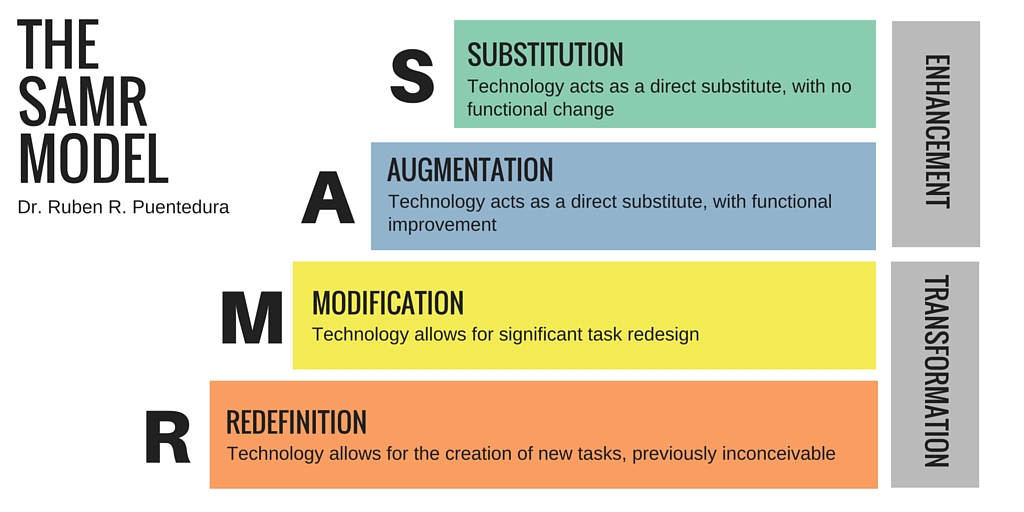 |
| Image Source: Wikimedia Commons |
The Enhancement Levels
The technology integration of the first classroom falls into the first two categories. In Substitution, technology acts as a direct substitute for a traditional form. Teachers deliver content differently, but there is no functional change to the lesson or activity. Some examples of Substitution that I have seen in my experience include
- Using a Chromebook or iPad to take notes instead of a pen and paper
- Using an ebook or audiobook instead of a physical book
- Using an online database instead of physical nonfiction books and magazines
- Using a SmartBoard instead of a blackboard to write or annotate a document
- Taking an online version of a test instead of a pencil and paper test
- Scanning worksheets, converting them to PDFs, and posting them online on Google Drive
In Augmentation, the teacher is still substituting something, but there is a functional improvement to the task or lesson. Some examples of Augmentation that I’ve seen in my experience include
- The teacher uses PearDeck to take a digital poll, answer questions, or provide opinions. This interactive feature can easily be incorporated into Google Slides presentations.
- Include interactive digital elements like comments, hyperlinks, and multimedia.
- Gamify quizzes with Kahoot to increase engagement and answer questions in a fun way.
- Create a virtual bulletin board using Padlet.
The Transformation Levels
In the second classroom, technology integration is more transformative. In Modification, the teachers integrate technology to allow for significant task redesign, digital interaction, collaboration, and feedback. Through this, students can redevelop and adjust their school work along the way. Examples of Modification that I’ve seen include
- The students and teachers instantly share what they found online by sharing their screens.
- Students collaborate on a shared document or project on Google Suites.
- Students and teachers create a video with iMovie. They can also create a podcast to share information.
- Teachers use Google Classroom to run and organize the class and share grades.
The final level of SAMR is Redefinition, in which teachers and students use technology to accomplish something previously impossible. The teacher redefines the learning objectives and creates a new educational experience. Examples of Redefinition are
- Students and staff create YouTube videos and blogs, allowing their peers and the community to interact with their findings.
- Using virtual reality to create an immersive experience.
- Hold a virtual author visit.
- Hold a virtual field trip.
- Collaborating with students in other schools to create a project.
Self-Evaluation
Where I am Now
As a library and technology assistant, it is my job to help students be responsible digital citizens and develop media literacy to become better consumers and creators of digital media. Looking at the SAMR model caused me to reflect on which level I spend most of my time in and ways I could better utilize technology to help, model, and guide my students in their usage. Youki Terada stated in the article “A Powerful Model for Understanding Good Tech Integration” that people can use the SAMR model to explore options and strategies to accomplish a lesson at hand, engage students, and develop a learning environment that resembles real-world learning and interaction. Each level has its own merits depending on the task or situation at hand. After some reflection, I believe I spend most of my time at the modification level. I use Google Classroom to organize and share ELA, Math, Research, Interactive, and Science Resources with 3rd, 4th, and 5th graders. The librarian and I invite students to share their videos and projects on Google Classroom. This way, other students can find examples of various projects. I also post links to databases, the online catalog, virtual choice boards, and instructional lessons on Google Classroom. The school community also learns about library programming and events on the dedicated Google Classroom. The Choice Board below is an example of activities that we posted in preparation for International Dot Day. There is a mix of website, videos, and games. I also use Google Docs, Slides, and Sheets to seamlessly collaborate and edit projects with the librarian, teachers, and district staff. For example, I share and edit spreadsheets with Chromebook information on Google Sheets. This way, we know which Chromebooks are out for repair, which student has which Chromebook, any missing parts and fees, and more. We can share knowledge this way.
 |
| Choice Board Source: Blog Author |
Where I Want to Be
I will eventually love to explore ways to apply the redefinition level because I do not have as much experience using it at the school library. I want to teach students to use technology to connect their learning to real-world outcomes and become part of the broader community. For example, I would eventually like to plan and have a virtual author visit at my future school library. Virtual author visits can increase interest in reading for pleasure through interactions with the author. Students can ask questions to gain knowledge on the insights of writing. If you want to learn how to coordinate virtual author visits, please check out these articles from Scholastics and Edutopia.
I would also eventually like to find ways to use virtual reality and connect usage with the curriculum. For example, students can use virtual headsets to “travel” to different ecosystems and biomes. This way, they can be more immersed in the topic and have a more transformative experience learning about the environment. Immersion is a step beyond learning about it from books and videos. I would also like to continue to work on the Traveling Mural Project, a yearly collaborative project that connects our school to nine other schools. Participating schools around the country are divided into groups of ten. Each school picks a picture book and creates a ten-feet mural around it. Students add and create artwork for the mural during library time. My school created this mural last year based on the book, Maybe Something Beautiful: How Art Transformed a Neighborhood by F. Isabel Campoy and Theresa Howell.
 |
| Image Source: Blog Author |
When the mural is complete, we cut it into ten pieces. One part stays with the school, and we send the rest to the other nine schools. The schools will display the pieces side-by-side to create a whole new mural. We also include information about the school, the book, the process, and photos with the mural. I would eventually like to take this a step further by incorporating a QR code that the other schools can use to go to a YouTube video or a website with images and videos of the school working on our part of the mural. Overall, I like how this project allows schools to collaborate and create pieces of art from works of literature.
References
Terada, Y. (2020, May 4). A Powerful Model for Understanding Good Tech Integration. Edutopia. https://www.edutopia.org/article/powerful-model-understanding-good-tech-integration/#:~:text=Good%20technology%20integration%20isn%27t,for%20the%20lesson%20at%20hand.&text=The%20biggest%20obstacle%20to%20teaching%20online%20probably%20isn%27t%20the%20technology..


Your mural project sounds fantastic! The beauty of SAMR is that you can vary your level based on individual lessons. You'll reach transformation with projects in which you have already mastered the pedagogy and content. Thanks for a great post.
ReplyDeleteJessa, I love the collaboration of schools on your mural project. I wish the schools in my district would do this. I think it would provide more connection with one another versus competition. I know personally and at work, I am one who uses Google products a lot more for organization of files for the teacher I work for and sometimes things for the classroom.
ReplyDeleteThank you, Jessa for teaching! I appreciate the SAMR model due to the scaffolding potential. I wonder if teachers can be assessed on this type of framework? Often teachers who lack confidence in how to use technology to capacity, may not know that augmentation and modification of programs are possible. Moreover, I appreciate your story of two classrooms as there are many reasons to celebrate student collaboration in classrooms. Also, I can see how traveling to different biomes captures engagement!
ReplyDelete